
A practical, benchmark-backed guide to the best open source large language models you can run locally on any GPU with 16GB of VRAM in 2026 — including RTX 4080, RTX 5080, RTX 3090, and AMD RX 9070 XT. Covers the latest models like GPT-OSS 20B, Qwen3.5 27B, Qwen3.6, Gemma 4, and GLM 4.7 Flash — with real speed benchmarks and an Ollama quick-start guide.
Sixteen gigabytes of VRAM is no longer mid-range — it's the new serious tier for local AI. The RTX 4080, RTX 5080, RTX 3090, and AMD RX 9070 XT all land in this category, and in 2026 they unlock something 8GB simply can't touch: 20B+ parameter models running entirely on-GPU, at full speed, with long context windows.
That's not a minor upgrade. At 8GB you're squeezing 7B–9B models into tight constraints and hitting intelligence ceilings on hard tasks. At 16GB, you're running models that genuinely rival GPT-4-class performance from just a year ago — completely offline, completely private, zero API costs.
But 16GB is also where the wrong choice stings the hardest. A 27B model with CPU offloading crawls at 6 tokens per second. The right 20B MoE model on the same card hits 140 tokens per second. That's a 23× difference on the same hardware — caused entirely by picking the wrong model.
This guide covers the latest models — GPT-OSS 20B, Qwen3.5 27B, Qwen3.6, Gemma 4, and GLM 4.7 Flash — with real benchmark numbers and exactly which one to pick for your use case.
Why 16GB Opens a Different League
The jump from 8GB to 16GB is the most meaningful hardware step in consumer local AI right now. Here's what actually changes:
Parameter count doubles. You go from 7B–9B models to 14B–20B. At this scale, models handle multi-step reasoning, complex codebases, long documents, and nuanced instructions in ways that smaller models genuinely can't.
MoE models become viable. Mixture-of-Experts architecture (used by GPT-OSS 20B, GLM 4.7 Flash, and Qwen3.6 35B-A3B) allows models to have massive total parameter counts while only activating a fraction per token. The result: you get the intelligence of a 30B+ model at the inference speed of a 7B.
Context windows grow. At 8GB, running 32K context forces CPU offloading. At 16GB, you can hold 32K–128K context entirely in GPU memory — critical for document analysis, long coding sessions, and agentic tasks.
The critical rule remains the same as on 8GB: keep the model entirely within VRAM. A model that spills into system RAM over PCIe will drop from 100+ tokens/second to 6–20 tokens/second. Always check your VRAM usage before committing to a model.
Quantization Guide for 16GB VRAM
With 16GB, you have real breathing room:
Q4_K_M — Your default for 20B+ models. Best balance of quality and memory. Runs GPT-OSS 20B at ~13.7 GB with headroom for context.
Q5_K_M — Use for 14B models when you want higher quality and context stays under 16K tokens.
Q8_0 — Near-lossless quality. Works for 14B models on 16GB, leaving around 6GB for context.
Q2/Q3 — Only if you're trying to push a 27B model onto a single 16GB card. Expect quality trade-offs.
Pro Tip: Qwen3.5 27B at Q4_K_M needs ~24 GB — it will partially offload to CPU on a single 16GB card. If you want Qwen3.5 quality, use the 9B variant at full GPU speed, or use llama.cpp which handles split inference better than Ollama for oversized models.
Top 5 Open Source LLM Models for 16GB VRAM in 2026
🥇 1. GPT-OSS 20B — Best Overall
Best for: Coding, reasoning, long documents, agentic tasks, daily use
GPT-OSS 20B is the undisputed winner for 16GB VRAM in 2026. Released by OpenAI under the Apache 2.0 license, it uses a Mixture-of-Experts architecture that delivers extraordinary efficiency: only a fraction of its 20B parameters activate per token, giving it the intelligence of a much larger model at the speed of a small one.
The numbers speak for themselves. On an RTX 4080 it hits 139.93 tokens/second — the fastest of any model in this tier. On an AMD RX 9070 XT 16GB, AMD's own tests confirm it as the fastest consumer GPU setup for GPT-OSS 20B. It scores 52.1% on the intelligence index, 77.7% on LiveCodeBench, and achieved perfect scores on logic tests in independent evaluations.
It was trained with reinforcement learning to excel at function calling and chain-of-thought reasoning — making it exceptional for agentic and MCP-based workflows, not just chat.
VRAM usage: ~13.7 GB (Q4_K_M at 60K context)
Decode speed: 139.93 tokens/second on RTX 4080 / 256 tokens/second on RTX 5090
Context window: 128K tokens
License: Apache 2.0
Intelligence index: 52.1% — best in class for 16GB
ollama pull gpt-oss:20b
ollama run gpt-oss:20b
🥈 2. Qwen3.5 9B — Best Quality-Per-GB
Best for: Long context, vision tasks, multilingual, agentic coding
Qwen3.5 is Alibaba's latest model family released in early 2026, and the 9B variant is the sweet spot for 16GB cards. It's a multimodal hybrid reasoning model — meaning it handles images, text, and code natively, with both thinking and non-thinking modes, across 201 languages and 256K context.
On a 16GB card, Qwen3.5 9B runs fully in VRAM at Q4_K_M or Q8_0, giving you excellent quality with the full vision encoder active. Benchmark-wise it leads its weight class on intelligence metrics — the 9B scores 32.4 on the Artificial Analysis Intelligence Index, 38% ahead of competing 9B models.
Note: The 27B variant requires ~24 GB for full GPU inference and will partially offload on a single 16GB card — usable but expect ~6 tokens/second. For interactive use on 16GB, the 9B is the right choice.
VRAM usage: ~6.96 GB at Q4_K_M / ~9.5 GB at Q8_0
Decode speed: 54–58 tokens/second (Q4_K_M), 35–40 tokens/second (Q8_0)
Context window: 256K tokens
Strengths: Vision + text, hybrid thinking, 201 languages, agentic coding
Note: Run via llama.cpp or Unsloth — Qwen3.5 GGUFs are not fully compatible with Ollama due to separate vision files
# Use llama.cpp for Qwen3.5
./llama-cli -m qwen3.5-9b-Q4_K_M.gguf --ctx-size 32768
🥉 3. Qwen3.6 35B-A3B — Best for Agentic Tasks
Best for: AI agents, tool calling, function calling, coding workflows
Qwen3.6 is Alibaba's April 2026 release and an instant standout for agentic use cases. The 35B-A3B MoE variant has 35B total parameters but only 3B active per token — meaning it runs at the memory and speed cost of a 3B model while bringing 35B-class intelligence. On a 16GB card it fits at Q4_K_M with some context headroom.
What makes Qwen3.6 special isn't raw benchmark scores — it's tool-calling reliability. In agent framework tests with real multi-step tasks (file management, code execution, API calls), Qwen3.6 consistently completed complex workflows that other models failed on. The developer consensus in 2026 is clear: for agentic pipelines, Qwen3.6 is the most reliable open-source choice available.
It also scores 77.2% on SWE-bench Verified for coding — among the highest of any locally runnable model.
VRAM usage: ~8–10 GB (Q4_K_M, MoE active parameter efficiency)
Decode speed: ~33–50 tokens/second depending on task
Context window: 128K tokens (use 32K on 16GB for best performance)
SWE-bench: 77.2% — top-tier coding
Strengths: Best tool calling, agent reliability, coding
ollama pull qwen3.6:35b-a3b
ollama run qwen3.6:35b-a3b
4. Gemma 4 9B — Best for Vision & Tool Calling
Best for: Multimodal tasks, structured outputs, local agents, function calling
Google's Gemma 4 9B is the most accessible vision + tool-calling model for 16GB cards in 2026. Released in April 2026 under the MIT license, it runs comfortably at 6 GB VRAM, leaving massive headroom for context and parallel tasks. It supports native image understanding, built-in function calling, and structured JSON output — all the essentials for building local AI agents and pipelines.
While Qwen3.6 beats it on complex agentic tasks, Gemma 4 9B excels on speed and simplicity. It's the fastest model in this comparison for short-context tasks, has first-class Ollama support (unlike Qwen3.5), and is the recommended pick for local OpenClaw and similar agent frameworks at this hardware tier.
On intelligence benchmarks, Gemma 4 leads open-source chat-preference rankings and holds its own on reasoning — making it a well-rounded, fast, and easy-to-deploy choice.
VRAM usage: ~6 GB (Q4_K_M)
Decode speed: High — fastest at short contexts in this tier
Context window: 128K tokens (use 8K–16K locally to avoid overflow)
License: MIT
Strengths: Vision, tool calling, structured output, fast, full Ollama support
ollama pull gemma4:9b
ollama run gemma4:9b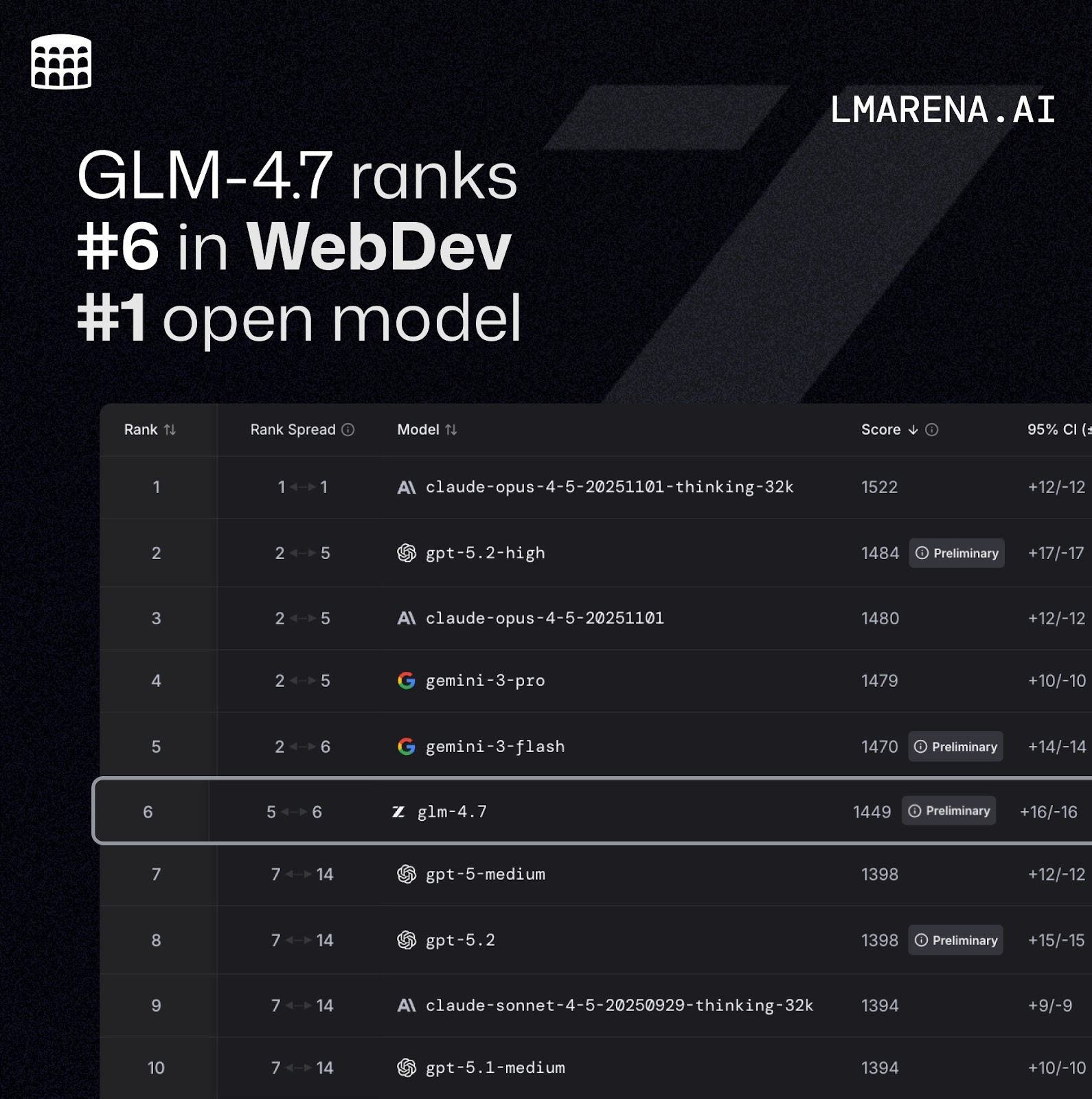
5. GLM-4.7 Flash — Best MoE for 16GB
Best for: Fast responses, balanced intelligence, coding, multilingual
GLM-4.7 Flash from Zhipu AI (Z.ai) is a 30B-A3B Mixture of Experts model — 30B total parameters with only 3B active per token. On a 16GB card it partially offloads to CPU (roughly 27% CPU / 73% GPU split), but thanks to the MoE architecture it still delivers a solid 33.86 tokens/second — faster than many fully in-VRAM dense models.
It scored Tier B (64/100) in real-world coding benchmarks and performs well across multilingual tasks and general intelligence. The 30B total parameter count gives it meaningfully better knowledge depth than pure 7B–9B models, and the MoE efficiency means you're not sacrificing too much speed for that intelligence bump.
If you need a model that punches above its active-parameter weight class and don't mind a small CPU offload, GLM-4.7 Flash is an excellent option.
VRAM usage: ~15.3 GB (27% CPU / 73% GPU split at 19K context)
Decode speed: 33.86 tokens/second
Context window: 128K tokens
Strengths: MoE efficiency, multilingual, broad knowledge, balanced performance
ollama pull glm4.7:flash
ollama run glm4.7:flash
Quick Comparison Table
ModelArchitecture,VRAM, UsedSpeed, Best Use Case, Context
GPT-OSS 20B 🥇MoE, ~13.7 GB, 140 t/s, Best overall, 128K
Qwen3.5 9B 🥈Dense, ~7–9.5 GB, 54–58 t/s, Vision / long context,256K
Qwen3.6 35B-A3B 🥉MoE, ~8–10 GB, 33–50 t/s, Agents / tool calling, 128K,
Gemma 4 9BDense, ~6 GB, Fastest, short ctx Vision / agents / fast, 128K
GLM-4.7 Flash MoE, ~15.3 GB, *34 t/s, Balanced / multilingual, 128K
*GLM 4.7 Flash uses partial CPU offload (~27% layers) on 16GB cards.
Quick Start: Running Your First Model with Ollama
Step 1: Install Ollama
# Linux / macOS
curl -fsSL https://ollama.com/install.sh | sh

# Windows: Download installer from https://ollama.com
Step 2: Pull and run a model
# Best overall — fastest at 16GB
ollama run gpt-oss:20b

# Best for agents and tool calling
ollama run qwen3.6:35b-a3b

# Best for vision and fast responses
ollama run gemma4:9b

# Best MoE for multilingual
ollama run glm4.7:flash
Step 3: Set context window for 16GB
# In Ollama chat session — set context to safe 16K for most models
/set parameter num_ctx 16384

# For GPT-OSS 20B — can go higher comfortably
/set parameter num_ctx 32768
Important: Always check your model's GPU usage with
ollama ps. If you see a CPU/GPU split, your model is offloading. Either reduce the context window or switch to a lighter model.
Key Tips for 16GB VRAM Users
MoE beats dense at this tier. GPT-OSS 20B, Qwen3.6 35B-A3B, and GLM-4.7 Flash all use MoE — they give you more intelligence per VRAM byte than any dense model at this size.
Keep context under 32K for interactive use. Even on 16GB, pushing 128K context will slow everything down. 16K–32K is the sweet spot for fast chat.
Qwen3.5 27B is not ideal on a single 16GB card. At ~24 GB needed for full GPU inference, it will offload to CPU and drop to ~6 tokens/second on Ollama. Use llama.cpp for better split-inference performance.
Gemma 4 has the best Ollama support. If you want zero-hassle setup with full vision and tool-calling, Gemma 4 9B is the pick — it's officially supported and works out of the box.
AMD cards work too. The RX 9070 XT 16GB has been officially validated by AMD for GPT-OSS 20B and delivers competitive speeds. Use AMD Software Adrenalin Edition 25.8.1 or later for best performance.
The Bottom Line
The 16GB VRAM tier in 2026 is where local AI stops being a hobby and starts being a genuine productivity tool. You're running models that match last year's frontier performance — entirely offline, entirely private.
Your winner for almost every use case is GPT-OSS 20B — it's the fastest, most reliable, and most capable model that fits entirely within 16GB VRAM, and it's not close.
For agentic workflows and tool calling, swap in Qwen3.6 35B-A3B. For vision tasks with fast responses and zero setup friction, Gemma 4 9B. For long-context document work or multilingual tasks, Qwen3.5 9B. For a balanced MoE that punches above its weight, GLM-4.7 Flash.
Install Ollama, pull GPT-OSS 20B, and you'll have a fully private AI assistant that runs at 140 tokens per second — on hardware you already own.
If you have more limited GPU ( 8GB VRAM ) You can still run local ai on your computer. Read More